Posts

Showing posts with the label Topaz Labs

Running... Again?

Image
  If you know me you know there was a time about 10 years ago or so where I was running. A lot. At least 5 days a week and at least 5 miles a run. I wasn’t training, I wasn’t preparing for a race or a marathon. I just found myself enjoying the time spent running. I wasn’t obsessed with numbers, but I kept track of them all and liked seeing improvements in time and distances. It was good physical health and mental health. Then I tweaked my knee. Not bad enough that I couldn’t walk on it, just a tweak that told me I needed to back off of running for a little bit. So I decided on 2 weeks. At the end of 2 weeks I aborted a run very early as the pain was still there. 2 weeks became 3, became a month, became 5 years. 

The Path

Image
Following the Footsteps Continuing the black and white kick I'm on currently we have this sandy and fairly steep path down. The timing wasn't great, I'm here an hour before golden hour and with a very strong sun, so I had to frame accordingly. This is a river or creek (the maps go back and forth as to the naming) that merges with the ocean. At this point I'm about a half mile from the ocean, and with all that water with a strong sun there's a lot of glare.

Week of Black and Whites, Day 3

Image
Up Close Normally I wouldn't shoot these flowers in black and white. They have a stunning purple color to them which is what drew my eye to them in the first place. But while looking at them through my camera, with a black and white setting selected, I found they looked more delicate in black and white than in color. I'll be sure to share the color version next week. Shot with my G3 and processed through Lightroom and Topaz Labs. I wanted to bring out the veins in the petals, while still giving a delicate look to the flowers.

Week of Black and Whites, Day 2

Image
Sand Waves One of the things to look for when shooting for black and whites are patterns and sights that don't require color to make the photo. Now on top of the pier I was under yesterday, I spotted these sand waves and worked to try and bring them out more. Shot with my G3 and processed through... (wait for it) Lightroom and Topaz Labs Black & White Effects. Yes, all photos are now going through Lightroom now. Still figuring some things out, but all in all the transfer is now complete.

The Birds

Image
The Bird Invasion I don't do street photography much, and when I do it's never of people. I watch videos of street photographers getting in front of people and taking their photos and I get anxious. And I'm not even there! So my street photography stuff is primarily buildings or other scenes where I'm not feeling like I'm invading anyone's personal space. In terms of this shot, I'm shooting for the birds. They make a nice compositional line leading from the back of the photo to the front and provide good contrast to the pre-sunset sky. I intentionally kept the bottom left corner dark as the structure is kind of distracting. I went black and white with this from the very beginning, meaning I had my camera set to record a color RAW and a black and white JPEG. I really liked the look of the JPEG black and white and went to emulate that look through the RAW conversion to black and white. Basic exposure fixes were taken care of in Aperture (yes, still in ...

Moody Denver

Image
Moody Denver Airport I don't normally highlight a mobile photo here on my blog. I tend to use my VSCO Grid to show them. The reasons aren't necessarily because they aren't as good of photos taken with my dedicated camera, but because usually there's just less that can be done. Or more accurately, if using RAW photos allows me to push processing to 11, using JPEGs are more like a 5. And that's starting off with a clean photo to begin with. This photo wasn't clean, was shot through a dirty window at Denver International, and was noisy all over. The X, to it's credit, did automatically select to use it's version of HDR processing, which at least gave me something to work with. With mobile shots I typically stick to mobile tools for processing. The built in Google+ tools are pretty decent for most edits and processing, but I tend to use VSCO's excellent VSCO Cam for Android for the editing tools. I've tried using other dedicated camera apps...

July 4th Sunset

Image
The Pre Fireworks Show I shot fireworks for the first time this past July 4th. My results were pretty hit and miss, with the majority falling in the miss category, though it's not all my fault. I was told my tripod wouldn't be allowed in the viewing area, so I was forced to leave it in the car. I had gotten there early enough to get a good spot right up front and was able to make use of the rail with a 45 degree angle to rest the camera on, but my shots were pretty much click and pray shots. I started off using a small aperture with shutter priority set to about 4 seconds, but found this to be clumsy. Switching to bulb mode, which allows me to open and close the shutter based on how long I hold down the shutter button, worked out slightly better. Again, though, my camera was at my hip pointing up, so it wasn't really ideal. I will say that having a screen that flips and tilts out made this much easier to shoot. Though the goal for me was the shoot fireworks, this came...

Trillium Falls

Image
Trillium Falls Waterfalls. I love finding them and photographing them, so here's a new one, for me; Trillium Falls. Named after a flower that blooms in abundance in the surrounding area. Located in the Redwood National and State Parks, just north of a tiny town called Orick, the falls are easily accessed by a short hike or about a mile or so. If you've never been in a redwood forest it's really a very different kind of place. It's very lush, humid, and green with all kinds of ferns and plants on the ground and towering redwood trees. Sound doesn't escape the forest it echoes inside it. For an outdoor place there's a definite feeling of being indoors. The falls aren't the most exciting waterfalls there are, it's maybe ten feet high, but there are lots of little cascades that make for interesting mini-falls shots. The above shot is taken from a foot bridge and as you can see it's very green. The shot is also an HDR shot. "Upper" Tri...

Crater Lake Panorama

Image
Crazy Blue Crater Lake Took a quick trip up to Crater Lake National Park in Oregon Saturday. It was as stunning as I remembered it. My first visit here was in the late '90's when helping my friend Cory get back to California for summer break. He was going to school in Washington and he planned a stop here. I'd never heard of it, and this being before the widespread adoption of smart phones and mobile internet, all I could find out about the place was from a AAA map. I had never seen water so blue before, or since. Tahoe is close, but not near as stunning. Interesting note, Crater Lake is not actually formed due to a meteor impacting but from a volcano. In terms of the photo, I kind of jumped the gun with how I share. I normally try to share the photo on the blog and social media at the same time, but after processing the photo I was really liking it and posted to G+ and the others first. The shot is a handheld six shot panorama stitched in Photoshop Elements (usually ...

Architecture Month

Image
Loleta Lumber Over at  +The Patch - PhotogrAphy Themed CHallenge  we're gearing up for architecture themes for the month of March. If you you're not familiar, I'm helping run a project this year that has both a monthly theme and weekly themes. It's a little more challenging than a typical single theme project and has been forcing participants to think a little bit more about their shots. It's been a lot of fun to see how different people interpret the theme and to get together with my co-moderators to pick winning photos each week, which are then eligible for a monthly prize of a  +Topaz Labs  plugin. This isn't the shot I'll be using for week one (Building Features & Architecture) but I enjoyed processing this seven shot HDR and thought it'd be a nice prelude to the month. If you're an architecture photographer, or know someone who is, have them check us out. People can join in at anytime.

The Other Side

Image
From the Other Side This is a tale of futility. A tale of ignoring hard data and still going after the shot. I happened across this rock formation sometime last year ( this  is probably the best shot of it from it's south facing side) and have been desperately trying to come up with an interesting way to shoot it. I've tried to force different looks on it, all to bad ends. Having only been able to shoot it from the south facing side due to tide issues, I had deluded myself into thinking the other side was the money shot. What I wanted was to shoot this with some sunset perfectly framed in it. So like any good landscape photographer I Google Earthed the approximate location, and this is what Google Earth had to show: Google Earth: Not Looking Good So as we can see my spot is the middle of a cove with two heads to the north and south of it. The window of my formation faces north/south, and as any good Boy Scout knows, the sun sets in the west. And, to make matters more ...

Coming In at Sunset

Image
Sunset This was one of those times where I was planning on shooting something else but stumbled across this. My head was wrapped around the shooting of the other site that I wasn't really thinking too much about how to shoot this. For example, it didn't dawn on me until post processing that the floating dock I was on, well, floats and is susceptible to up and down motions. So though the tripod helped for some kinds of motions (my jittery hands) it didn't do anything for the floating up and downs. And of course I turned off image stabilization, like I think you should, when shooting on a tripod. This is a 7 shot HDR, and the negative exposures, since they have faster shutter speeds, didn't show the bobbing effect of the longer exposures. This is where having a good input sharpener comes in handy. Topaz Labs InFocus  really did the trick for this, especially when there are so many masts in contrast to the sky. This shot was a longer process as I took care of noise a...

Star Effects

Image
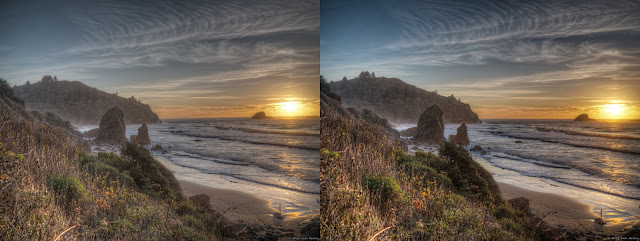
Without Star Effects on the Left. With a subtle dose of Star Effects on the Right. Some plugins I don't use nearly as often as maybe I should. And, quite frankly, there are some I forget I have, except in those few instances where I see a shot and think such and such plugin will really spice things up. That's the case with  +Topaz Labs Star Effects . It's not a plug-in I use daily, but when a shot comes up with the right features, it can be a lot of fun. Basically Star Effects adds some oomph to your light sources. Think of it as bling for your lights. And you can control just how much oomph there is. As you can see in the photos above I think I went for a more subtle look. So how does it work? When you bring a photo into Star Effects it looks for light sources and marks them. You can control the threshold for what is and is not a lightsource, or you can paint them in or out. Then you can choose from various presets the look and flare of your stars. Everything from t...

Topaz Labs Complete Collection

Image
My Arsenal As some of you probably already know, or have guessed, I use a lot of  +Topaz Labs  plugins in my photography work. It started with Adjust  which I wrote up a pretty popular (for my blog) review here . Then, because I hate noise and micro fourthirds cameras seem susceptible to it, I went looking at DeNoise . It's nothing sexy in terms of the look of your photo, but without it nothing else can really happen. So the fact that Topaz Labs is putting their entire collection on sale over the Black Friday/Cyber Monday weekend is pretty big news. That's 14 products, which would normally retail for $770, usually sells for $380 on sale for $199! So what are the highlights in this group? DeNoise: You should hate noise in your photos, and the built in noise removers in Aperture or Lightroom aren't nearly as powerful as this guy is. It often amazes me how just using a preset in the plugin can clean up a photo, and this goes for photos taken with my phone or my ca...

Foggy Valley

Image
Fog Filled Valley An early morning trip that involved a driving up and through some mountains rewarded me with some great views of fog flowing over the hills and mountains and filling up a valley. This is the eastern end of the valley. I wish I had taken the time to setup the tripod and snap off a panorma of this valley because it was pretty incredible to see, and the couple shots I have of this really don't do it justice. In terms of processing this shot the tool that I find myself constantly amazed with is Clarity  by  +Topaz Labs . It really brought out the ridges of the mountains and some shape to the fog. Speaking of Topaz Labs, if you or someone on your holiday gift list is a photographer and in need of some excellent plugins, keep an eye out here and on my social media profiles for some links to Topaz Labs Black Friday/Cyber Monday deals. It'll be a great price on the COMPLETE collection of excellent Photoshop/Lightroom/Aperture/iPhoto plugins.

On the IR Road

Image
On the IR Road This was one of those, "what would happen if I do this?" shots. I had been taking some infrared shots for my black & white project  when I thought I'd step out onto the road and try a shot. As I mentioned in the linked post my 720nm IR filter and my non-converted to IR G3 don't make a good combination for faux color IR shots, but with a little help from Black & White Effects  I'm able to get some very high contrasty shots in black and white. Check out the shadows on the right side. I think they play with the mind a little; to see all this deep dark blacks yet still have shadows on the road is kind of a mind trick. I suggest clicking on the photo to see it full screen.

Weekly Photo Projects, Week 38

Image
Week 38: Landscape For  +Project 52 B&W  our theme was Landscape. I had recently read up on some infrared workflows and techniques so I was once again tempted to try infrared out. It seems my 720nm IR filter is good with black and white conversion but not so good with doing faux color shots, so with that in mind I shot this. I really liked the outcome. The deep black sky was primarily achieved through the IR filter with some tweaking in Topaz Labs Black & White Effects 2 . The shadows from the bush on the right kind of play with you, I think, as you want to think this is a night shot. Week 38: Autumn Unfortunately I needed to use a backup shot for  +Weekly Photo Project 2013 's Autumn/Spring theme. It's almost a continuation of last week's  photo. In terms of anything special about this hot? I applied the Autumn preset in Topaz Labs Adjust  (on sale for Sept for 50% off using "septadjust") which gave it the warmish tone I had envisioned. Then j...

Topaz Labs Adjust

Image
Before (Left) and After (Right) of one of my favorite sunset shots processed with Adjust I've been wanting to highlight some of the tools and plugins I use often here on the blog because they have helped me learn and enjoy photography. One of these plugins, Topaz Labs Adjust 5, is also on sale this month, so I thought it was a good time to start. I'll have the link and the coupon code at the bottom. When I first got started with HDR photography I was initially disappointed with my photos after the HDR processing step. They looked flat and boring. They weren't like the HDRs I was seeing from other photographers. I then learned that most photographers finish their photos off with plugins, and one of the most popular ones was Topaz Labs Adjust. Adjust was my first plugin from Topaz and in general, and is still one of my most used plugins with my HDR work. Topaz and Adjust have come a long way since I first started using them 3 or 4 years ago. Adjust has moved from vers...

Unexpected Surprise

Image
Pewetole island at Sunset This was shot after what I felt was a disappointing session further down the beach, getting photos I wasn't happy with and feeling a little discouraged. More on that part in a later blog post. So I packed up my stuff, stuck my earphones in and was trudging back to the car when I for some reason decided to turn around. I'm glad I did! It was dusk and the light was fading fast so i had little choice but to hand shoot the seven brackets that make up this HDR. I generally don't like people in my landscape photos, but the more I looked at them in the final version here the more liked them. And they help convey scale. I like how the over exposed brackets bring in just a hint of color and texture from Pewetole Island, but isn't too bright. In terms of shooting and processing: As I said the brackets were handheld with an aperture of f4.5. Shutter speeds varied from 1/10 of a second to 1/640. As I normally shot in Aperture Priority mode (I adjust ...

Topaz Labs Restyle Preview!

Image
Just 4 different presets, with the original in the middle As I've mentioned many times here on the blog I'm a big fan of Topaz Labs plug-ins. So much so that the only ad on the site is for their web store. And, I should mention, if you purchase anything through that link on the right I do get a little something back from them. It isn't much, but I figured since I talk up their products a lot on here I would give this affiliate thing a shot. But another nice benefit for me, and in turn you guys, is I get to preview new products, and I have one to show today. Topaz Labs ReStyle. I'm not sure how to describe it, but to say it has the feel of Instagram filters, but with a whole lot more power and control to them. ReStyle seems to tone your photos using 5 colors and an astounding 1,000 presets to choose from. My beta copy doesn't have all 1,000 (they told me, I didn't count) but the number included already was mind boggling. And all the presets have names to th...

The Bridge

Image
Just another bridge I have a number of shots of the Golden Gate from different vantage points and different processing techniques. Today's shot is a single image that I worked on for awhile to get it to pop a little. The morning was dull and grey, and the photo was just as dull and grey. I didn't want to do anything drastic like masking out the grey clouds for a sunnier, bluer, less cloudy sky (though I did try, and it looked horrible), but I wanted there to be something  in the sky. Working with contrast and the excellent Topaz Clarity, I was able to get something out of the clouds. I sharpened, saturated, and brightened the bridge to get it to pop a little more. All in all I like the finished version here.

Popular posts from this blog

Running... Again?

The Pros and (Mostly) Cons of Upgrading to a 4K Monitor