Posts

Showing posts with the label pano

Running... Again?

Image
  If you know me you know there was a time about 10 years ago or so where I was running. A lot. At least 5 days a week and at least 5 miles a run. I wasn’t training, I wasn’t preparing for a race or a marathon. I just found myself enjoying the time spent running. I wasn’t obsessed with numbers, but I kept track of them all and liked seeing improvements in time and distances. It was good physical health and mental health. Then I tweaked my knee. Not bad enough that I couldn’t walk on it, just a tweak that told me I needed to back off of running for a little bit. So I decided on 2 weeks. At the end of 2 weeks I aborted a run very early as the pain was still there. 2 weeks became 3, became a month, became 5 years. 

Panoramas From the Road

Image
Between the Clouds Before we get into the meat of this post, if you're viewing this on a mobile device, these photos really don't translate that well on it. These are large panoramic photos and really need a large screen to do them justice. Now on with the post. Occasionally during my Eastern Sierra trip I had the idea to take panoramas to try and take in the full view of what I was seeing and feeling. I tried to focus on a part of the view I was seeing that would fill up my frame, but I felt that it didn't full get the whole feeling with only part of the view, but this led to other problems. All the panoramas I took were literally on the side of the road, meaning I was in the middle of driving, with someone who's not a photographer. So, not wanting to annoy them I left the tripod in the car and took these panoramas free hand. When taking handheld panos my general rule is to take many photos and to go well beyond and after my intended start and stop points so that...

Fogged in Panorama

Image
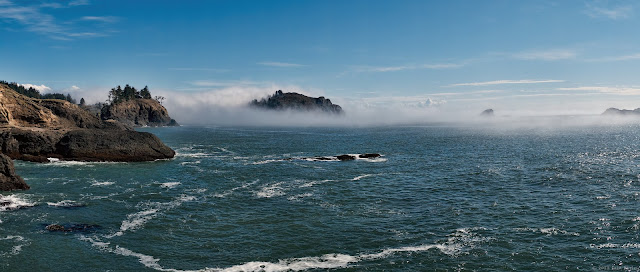
7 Shot Panorama On a rare sunny day in Humboldt I was able to trek to get this 7 shot panorama of College Cove with Pewetoll Island and Trinidad Head being fogged in. This is a seven shot panorama processed in Photoshop for the actual stitching. I also ran it through Hugin, but have been finding Photoshop's stitching to be more consistent. I thought Hugin would handle these shots better since it was handheld, but Photoshop just beat out Hugin. I then ran two copies of the photo through Nik and Topaz Labs software and at the end I chose the Topaz Labs processed version. In Adjust I used the Vibrance pre-set and fiddled with the adjustments from there. Then to finish it I took to Detail. I had originally envisioned this shot in black and white, but wasn't able to get it together in time for posting, though I think I'll try it later.

First Pano of 2013

Image
Streaky cloud sunset I've said it before, but I enjoy panoramic photos, even if they are troublesome to put together. I do panos so sparingly that I often forget why I don't do them more often, until I get to doing another pano. Though to be honest it's when I decide to try for an HDR pano where I really get into trouble. This shot is not an HDR panorama, but does include some new for me techniques for shooting. For those keeping track, this was taken on the same day as this . The clouds give it away. The first of these techniques was to shoot my shots with the camera in the portrait position. This didn't make sense to me at first as my camera covers more area horizontally than vertically so it would take more shots to cover the same area, meaning more chance of my stitching software to mess up. So I tried to take shots with more overlap to help the software out. The main benefit I saw with this is that the I had more excess photo to crop for the final shot. I was...

Day Panorama

Image
I find I do panoramas in spurts. So here's another panorama. I really like the clouds in this one. Photoshop Elements did a great job with this panorama, leaving me with little to do to hide the seams. It also has a very cool feature called Content Aware Fill. Typically when I do a panorama I end up cropping out the middle part because the stitching together process leaves the photo jagged along the edges. With Photoshop's Content Aware Fill it analyzed the parts of the photo that along the jagged edges then filled in the area to give the full height of the photo. Typically this means working in the corners, and where the photos come together. For the first time ever Photoshop actually did a good job of filling in the blank spaces. Lazy clouds over Trinidad

Panoramic Sunset

Image
One of my favorite type of photos is the panoramic shot. There are just some scenes that the widest angle lens probably isn't going to get. A fisheye lens might get it, but then there's all the distortion to deal with. But, at least for me, panoramas aren't the easiest to make and I forget just how difficult they can be until I'm 3 hours into processing and I can still see the seams of the individual photos. This is a 3 shot panorama taken on a tripod and with a sizable amount of overlap with distinguishing features to help the software figure out how to align things. Oh, and this shot panorama was also supposed to be an HDR panorama. Meaning a total of 15 exposures. First I tried making the five different panoramas for each exposure value. Problem with that is the software cropped it differently for each exposure making the resulting HDR blurry since they didn't quite line up correctly. This after multiple attempts. Then I processed the individual frames through ...

First Pano (Photocentric)

Image
For the most part the GF2 feature wise is a minimum step up over the old Canon. One area though that I find it lacking in is in the ease of tacking panoramic photos. The Canon has a shooting setting where after taking the first photo it would show the right edge of the previous shot photo so you could line up the next shot. This aided in making sure you didn't miss areas. The GF2 has no such setting. In a segment of cameras where the competition has a cool sweep panorama (press the shutter and slowly sweep across the scene) I find the lack of a panorama function to be annoying. Shooting a panorama is obviously not impossible; try to frame shots with a marker on the edge to help line up the set shot. And of course USE A TRIPOD. Photoshop Elements 8, which came with my extremely useful Wacom Bamboo tablet, did an excellent job of piecing together the 5 shots. This is a shot of Trinidad Bay. Click to see larger

Fave 5 From 2011 Part 2

Image
I'm still having difficulty believing it's December already, and 2011 is now measured in days. With the end of another year you'll be assailed by all kinds of "Top (Fill in the blank) of 2011". I thought I'd look back at the over 1400 photos I took in 2011 and pick my top 5 to be revealed over the final weeks of 2011. Photo number three combines my two favorite types of photos, large panoramas and HDR processing. Originally shot as a standard panorama (Go here to see the original panorama) I decided to try to HDR it. Since I shot the six shot panorama using both JPEG and RAW file types I was able to adjust the exposure levels to give the appearance of taking 3 separate exposures. This technique isn't as possible with JPEG because the file doesn't keep as much information about the shot as a RAW file would. I wasn't sure how best to process this; HDR all the shots of the panorama then stitch them all together or stitch three separate panoramas ...

Sunset Pano (Photocentric)

Image
A quick posting today, and one from a year or so ago. I just recently adopted a better system for keeping track of photos, so as I'm going through older shots I'm finding HDR and panoramic source shots that I had forgotten I had. This is one of those missed panoramas. 4 shots with a UV and a polarizing filter. Still too bright though. If I had an neutral density filter this would have turned out better. In other photography related news I got the chance to sit in on a demonstration on Topaz Labs' Adjust 5  (I use Adjust 4) and I'm really excited about it. Of all the plugins I have Adjust is my most used one. I think of it as my finisher to bring a little more oomph to a picture. Adjust 5 will bring more presets, the ability to stack presets on top of each other, and to brush out an effect on certain parts of a photo. I look forward to using this tool soon.

Hiking Surprise (Photocentric)

Image
I hope those of you who had a 3 day weekend enjoyed it. I took the time to get out and hike some. The first trail we hit didn't look very promising, until we rounded a bend and this came into view. I should have gone back to the car to grab the seldom used tripod that I had in there, but didn't want to hold up the rest of the group so did my best hand-held shot. So that's the first "problem" with this shot. The second problem I had was that it was washed out and pretty dull looking color wise. Like a previous shot  I took, I decided to try and HDR it to add a little punch to it. It turned out pretty good, I think. I really enjoy shooting panoramic shots, but find them a little disappointing when viewing them because they're restricted by my puny 22 inch monitor. When I first saw the house my thought was they were in a great place; sandwiched between rolling hills with the coast not far. Then I thought of the recent tsunami scare, and thought differen...

Beach Grass Redux (Photocentric)

Image
I was looking over my library on Aperture, in the mood to process some HDRs, when I came across the source photos of my earlier Beach Grass post. I really enjoyed this panorama and then I noticed I had shot it with RAWs and JPEGs using the camera's Panorama Assist function. I realized I could scratch two things off my photography to do list: a) process an HDR shot using one photo, and b) create an HDR panorama. So I got settled in to start the process. First was deciding on the process. Should I HDR each source shot first, then merge into a panorama? That didn't seem a good idea as I couldn't guarantee the panorama would look uniform at the end. Plus I didn't really want to process 6 separate shots. So after adjusting the exposure in Aperture for +2, 0, and -2 I went to Photoshop to make 3 panoramas. I was nervous that Photoshop would render each one differently, but got lucky that, as far as I could tell, they were the same. Then I brought the 3 source panoramas int...

Beach Grass (Photocentric)

Image
I love panoramic shots. Especially when my lens at it's widest angle just doesn't cut it. But panoramic pictures are difficult to both shoot and put together. Ideally I should use a good tripod to steady the camera and negate any up and down variation with notations to easily tell where to setup the camera for the next shot in the series. Sadly I a) have no such tripod and b) don't often carry one with me when I'm not planning to shoot from the beginning... which is most of the time I shoot. Today cameras have great settings to help you handhold your panorama scene; from Sony's sweeping method where you just slowly sweep the camera across the landscape to Canon's previewing the edge of the last shot so you can line up the next shot system. This usually gets good results for me. It's when putting it together that I get issues.  I have found the software solutions to stitching together panoramas to be iffy at best. I've used what comes bundled with my ca...

Pano

Image
I like panoramic shots in theory. Not having a super wide angle lens (or tasked with capturing a large scene) a panormic shot can be one way to capture it. If you're not familiar, a panoramic shot is combining 2 or more shots in a set order to make 1 large photo. For my camera I have a setting to help with making sure I'm not missing anything. I start from the left take a shot, rotate to the right and match up the details from the last shot on the right edge with the left edge of the new shot I'm composing. Then I feed the shots to a software application which stitches the shots together. It's really a pretty siimple process, but one I constantly forget to employ while out shooting.

Popular posts from this blog

Running... Again?

The Pros and (Mostly) Cons of Upgrading to a 4K Monitor